
Refunds, Copies & Cancellations
After a fiscal invoice is signed, you can issue a refund, print an official fiscal copy, or cancel the invoice. Each operation creates a new linked fiscal record — the original is never modified.
Note: Fiscal records are never edited or deleted. Refunds and cancellations create new linked records that are reported to the tax authority alongside the original invoice.
Refunds
Use a refund when a customer returns goods or when a sale needs to be corrected after fiscalization.
Go to Invoice History
Locate the signed invoice you want to refund
Tap the actions menu and select Refund
In the refund dialog, specify the refund amount and select the payment method to return funds through
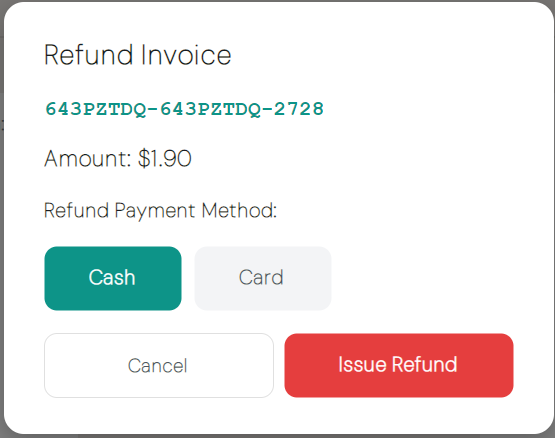
Confirm — a manager PIN is required
A linked refund invoice is created, signed by the SDC, and recorded in the history
After the refund:
- The original invoice status changes to Refunded
- The new refund invoice references the original invoice number
- The refund appears in the history with transaction type Refund
Note: The refund amount defaults to the full invoice total. Adjust it in the dialog if a partial refund is needed.
Fiscal Copies
A fiscal copy is an official duplicate of a signed invoice — use it when a customer needs another receipt.
- Go to Invoice History
- Locate the signed invoice
- Tap the actions menu and select Fiscal Copy
- Confirm the action
A new signed fiscal document of type Copy is created and recorded in the history. You can print it immediately or retrieve it later from the history.
Tip: Use Fiscal Copy rather than Reprint when the customer needs an officially registered copy. See Invoice History for standard reprinting.
Cancellations
Cancel an invoice when it was issued in error — for example, the wrong customer, wrong items, or wrong totals.
Go to Invoice History
Locate the signed invoice you want to cancel
Tap the actions menu and select Cancel
Review the cancellation confirmation
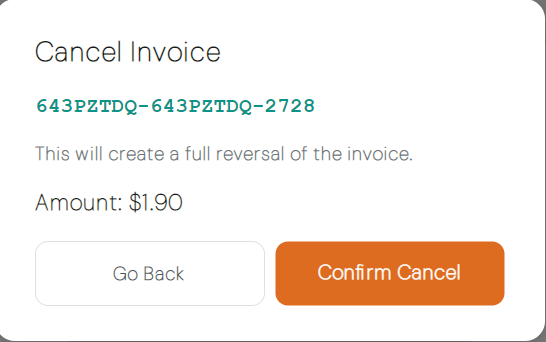
Confirm — a manager PIN is required
A cancellation record is created and reported to the tax authority
After cancellation:
- The original invoice status changes to Cancelled
- The cancelled invoice remains in the history — it is recorded, not removed
- A linked cancellation document is sent to the SDC
Note: Cancellation is irreversible. Verify the invoice before confirming.
Actions Available by Status
| Action | Signed | Refunded | Cancelled |
|---|---|---|---|
| Refund | Yes | No | No |
| Fiscal Copy | Yes | Yes | No |
| Cancel | Yes | No | No |
| Reprint | Yes | Yes | Yes |
Next Steps
- Invoice history — Search and view past transactions
- Invoice types — Understand invoice and transaction types