
Activating a Device
After purchasing an SDC license and downloading the SDC application, you need to activate it using one of your activation keys. FiscoBridge supports both online and offline activation.
Online Activation
This is the standard method when your device has internet access:
- Install and open the FiscoBridge SDC application on your device
- The application will prompt you for an activation key
 3. Go to the Customer Portal → SDC → Licences
4. Find an available key and click the copy icon to copy it

- Paste the activation key into the SDC application
- The application connects to FiscoBridge servers and activates automatically

Once activated, the key's status in the portal changes from Available to Used.
Offline Activation
If your device doesn't have internet access, you activate it with a license file (.pfx) issued for that device:
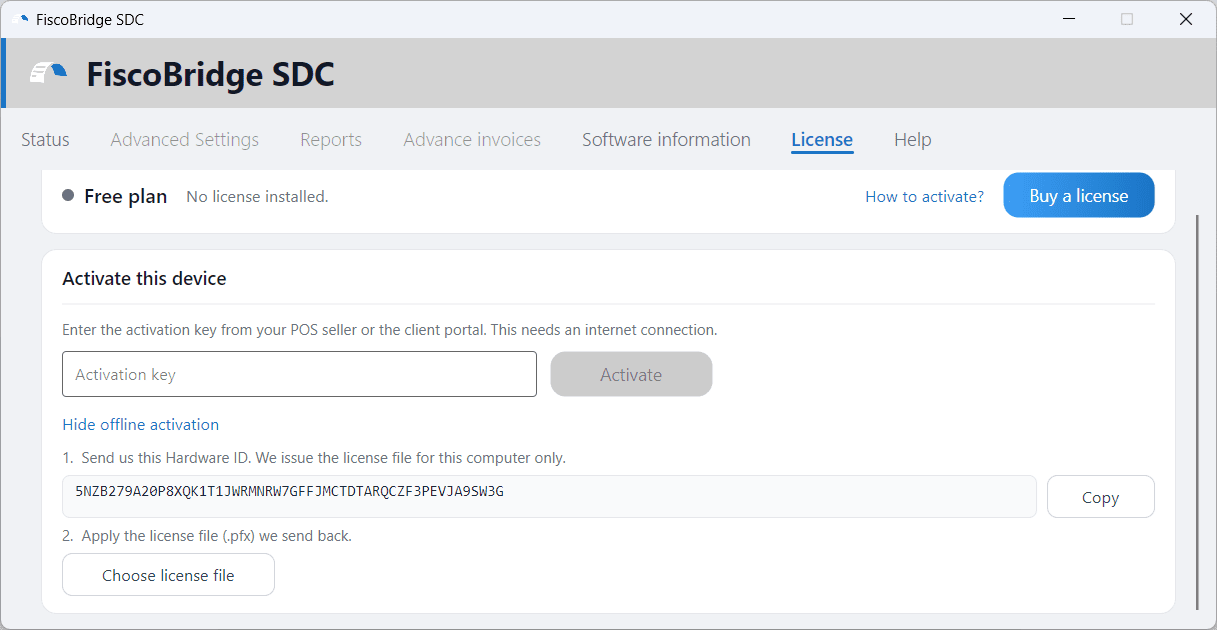
- In the SDC application, go to the License tab and click No internet on this device? Activate offline
- Click Copy next to the Hardware ID and move it to a device with internet access
- On that device, open the Customer Portal and go to SDC → Licences
- Find the key you want to use (it must have status Available) and click the Activate Offline key icon

- Paste the Hardware ID, click Activate, and confirm. The license file (
.pfx) downloads to your device - Transfer the file to the SDC device (e.g., via USB drive)
- On the License tab, click Choose license file and select the file
If your POS seller supplied the key, send them the Hardware ID instead and they will send you the license file.
Note: Offline activation permanently ties the key to the Hardware ID you enter, so check it before you confirm. It is only available for keys that haven't been used yet.
For the full walkthrough of both methods, see Applying a License.
After Activation
Once your device is activated:
- The SDC starts running and is ready to receive invoices from your POS system
- A PFX certificate is generated for your device (you can download it from the portal)
- The key status updates to Used and Active in the Licences page
Troubleshooting
Key not working?
- Make sure the key status is Available — used keys cannot be reactivated
- Check that your key hasn't expired (see the expiration date in the Licences page)
- Ensure your device has internet access for online activation
Device already activated?
- Each activation key is tied to one device. If you need to move a license to a different device, contact support at contact@fiscobridge.com
Next Steps
- Download your certificate — Get the PFX file for your activated device
- Manage your licences — View all your keys and their statuses